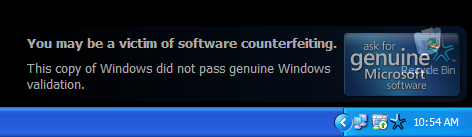
PETALING JAYA: Starting Wednesday, users with pirated copies of Microsoft Corp's Windows XP Professional operating system (OS) on machines that are Internet-capable could find their computer displays going black and with no screen icons visible.
There are 8.6 million users of Win XP Pro in Malaysia and about three million are expected to suffer the “blackouts,” according to Microsoft Malaysia.
To continue working, the user would need to reset the machine’s desktop background. Everything will return to normal. But when 60 minutes are up, the black screen will reappear and the user must go through the whole process again.
Is your computer suspected of "VIRUS INFECTION"??? Just follow this basic tutorial and your computer will just work fine.
First, you need to understand how a virus infects a thumbdrive from an infected computer. When a computer is infected, a process is created by the virus; will be running in the background. Whenever you plug in your thumbdrive and autorun is enabled, the virus will infiltrate your thumbdrive thus continuing the vicious cycle.
Step 1: Disable Autorun (Applicable to WinXP Pro & Vista)
Go to start > Run > type in gpedit.msc > Press Enter
Enable for all drives ... and you are done
Step 2: Tips to remove virus from thumbdrives
1) Download winrar or 7-zip (http://www.7-zip.org) 2) Plug in your thumbdrive into your computer
Go to start > all programs > 7-zip/winrar
Click on computer
Select Removable Drive
Del anything that end with .cmd .inf and probably .exe (if you do not know what file it is)
** Be sure that you know the content of your thumbdrive
This comprehensive PC-care utility has a one-click approach to helping protect, repair and optimize your PC. Advanced WindowsCare Personal Edition helps protect, optimize, and repair your PC –– with daily use.
Extremely Easy to Use
Defends Your PC with 100% Freeware
Cleans your Windows
Keeps Your PC Running at Peak Performance
Fixes Multiple System Errors
Safe and 100% Free
Review by IT-Secure [ 4 STARS ]
Iobit Advanced Windows Care Personal is not the most comprehensive tool out there in the market. However, it has a user friendly interface ... I would believe anyone can use it. It is JUST A CLICK AWAY.
It considerably speeds up your computer in just one use. Personally, I have been using this program for all my computers at home. It had served me well all along. The personal edition did not get 5 stars because it did not include all the tweaks that is needed for good computer performance.
With regards to it as a Freeware, it is a good product worth trying.
@ ITSecure
4:41 PM
Saturday, March 29, 2008
Hi there :)
With the ever increasing technologies available, it is really an uphill task to keep pace with it. I believe that some of you will be getting a new computer soon; esp the new Polytechnic students. A big question you will ask yourself ....
SHOULD I BUY IT FROM SCHOOL OR BUY IT OUTSIDE????
Before we begin to attempt that question, we should first understand the basic components of a computer.
Learning Objectives
- The technologies inside Intel® processors - RAM and Graphics??? - Harddisk : IDE OR SATA
The technologies inside Intel® processors
Clockspeed (Measured in GHz) is a traditional way to identify and choose a processors.
NOW TIMES HAVE CHANGED ... There are many more factors to consider such as;
- L2 Cache - Front Side Bus (FSB) - Hyperthreading (HT) Technology - Dual Core Technology
1.1 - L2 Cache
- Important component to improve overall computer performance
- Memory Storage Area where the computer places frequently accessed data - RAM has a larger area than cache; however slow in accessing data - Larger Cache = allow more data to be accessed faster storage area
1.2 - Clockspeed
- Still an important feature contributing to performance
- Faster Clockspeed = Execution of Instructions more quickly
1.3 - Front Side Bus
- Key Component in contributing to computer's overall performance
- Increase performance and responsiveness between processor to RAM and graphics
- Higher FSB = Application more responsive, improve performance
1.4 - Hyperthreading (HT) Technology VS Dual Core
Hyperthreading (HT) Technology enables 2 threads to be processed in a single core execution ; allowing partially parallel execution
Dual Core enables each thread to be processed in its own execution core (seperate thread) for truly parallel execution
@ ITSecure
11:37 PM
Thursday, March 6, 2008
The time of the year has come again ... IT Show 2008 is here
With ever changing technology and faster processors, we can never catch up with it but however, whenever we have the means, we should try "upgrade" parts of our computers to make it more efficient
Here is a guide as to where to purchase certain items
> RAMs (Recommend Kingston) - Best Bargain Computers or Active Foto & Electronics > Ext. Harddisk - Source around 6th floor for best deals (prices may vary frm shp to shp)
> Laptops and Desktops
Buy your laptops on the LAST DAY of the IT Show to get good deals. Prefably at around 7-9pm where most booths will try to sell off their products at a discounted rate. Furthermore, you can request for better upgrades rather than get the "free gifts" which are redundant in most cases.
What to ask for???
- Increase HDD Capacity - Increase RAM - Upgrade in OS - 3 years warranty - Reduce the product price further
SEE YOU ALL AT THE IT SHOW 2008 ... HAVE A GREAT DAY
@ ITSecure
12:06 AM
Sunday, February 10, 2008
The First Ever Independent Reformat Session by IsaacHelpDesk@IT-Secure [ Collaboration of IT-Secure & Muhammad Nur Hafiz Bin Khamsani ]
The Academic Year has come to an end ... As we prepare for the next Academic Year, we should keep our laptops in tip top condition. It is just like Spring Cleaning your house before Chinese New Year.
IT-Secure has came out with a hassle free solution to reformatting. No more Technical Details, CD Keys and IT Knowledge needed to reformat your laptop in future. Just one click of the button and everything is settled for you =D
** For more Information, View the Package Below
Details of Reformat Session
Venue: Republic Polytechnic Time & Date: 13 February 2008 (Wed); 12pm onwards
Services and Products
Package Deal @ ONLY $5
- Drivers and Clean Format - Includes BASIC Softwares for Republic Students (with Antivirus Solutions) - Free Software Backup on Users Hard Disk - Adding of School Domain - Norton Ghost 11 and Norton Backup
Introduction about Norton Ghost
Norton Ghost is a Program used by most IT Professionals to backup data in order for quick retrieval in future.
In this Package Deal, You will be provided with a Norton Backup which includes:
- Laptop Drivers - Dotnet Framework 1.0 and 2.0 - Internet Explorer 7 - Windows Media Player 11 - Microsoft Office 2007 - Tweak UI - Windows Update (Till Feb 08') - Performance Settings
Benefits of Norton Ghost
- NO MORE Technical Details on Reformatting (Jus one click and there goes) - NO MORE installing of Drivers and Basic Softwares - FAST Reformatting in Future...less than an hour and your system is ready to go
@ ITSecure
9:32 PM
Tuesday, January 22, 2008
"HELP!!!! My Friend send me a VIRUS "
Recently, there have been several reports where people get infected over Msn. The latest virus is in the form of MS-DOS where u have to download and install an application in order to get infected.


 Extremely Easy to Use